> ## Documentation Index
> Fetch the complete documentation index at: https://docs.corbado.com/llms.txt
> Use this file to discover all available pages before exploring further.
# One-Tap Login: Seamless Passkey Authentication
> Discover how Corbado's One-Tap Login revolutionizes user authentication with a single touch, boosting security and user experience. No more usernames!
Try Demo
Talk to Adoption Engineer
Whitepaper
## 1. What is One-Tap Login?
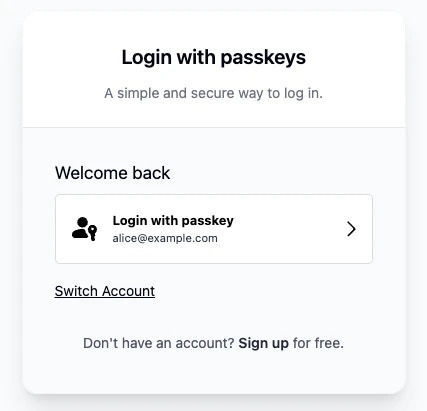 One-Tap Login is a feature from **Corbado Connect** that allows your users to sign in to your application with a single touch or click, plus a quick biometric verification like Face ID or a fingerprint scan. It completely eliminates the need for users to type their username or email address on subsequent visits, creating a truly seamless and secure login experience.
This is made possible by our dynamic **One-Tap Passkey Button**, which intelligently appears for returning users who have previously used a passkey on that device.
## 2. How It Works: The User's Journey
The magic of One-Tap Login lies in its simplicity. Here's a typical user journey:
A user signs up or logs in for the first time. During this process, they are prompted to create a passkey, which securely links their account to their device. Our [Passkey Intelligence](/corbado-connect/features/passkey-intelligence) engine notes that this user now has a passkey on this device.
When the user returns to your app, our system recognizes them. Instead of a blank login form, they are greeted with a personalized button, like "Login with Passkey as **[alice@example.com](mailto:alice@example.com)**".
The user simply taps the button, verifies their identity with their device's built-in biometrics (like Face ID or fingerprint), and they're in! No typing, no forgotten passwords, just instant access.
**Visual UI Flow Examples**: See the [One-Tap Login UI flows](/passkey-ui-flows/web/passkey-login/one-tap) for platform-specific visual demonstrations of this journey across macOS, Windows, iOS, and Android.
## 3. Key Benefits of One-Tap Login
Implementing One-Tap Login offers significant advantages for both your users and your business.
* **Drastically Improved User Experience:** By removing the friction of typing credentials, you make logging in effortless and fast, leading to happier users.
* **Increased Conversion and Retention:** A smoother login process reduces drop-offs and encourages users to return more often.
* **Enhanced Security:** One-Tap Login is built on the foundation of passkeys, which are phishing-resistant and far more secure than passwords.
* **Boosted Passkey Adoption:** Highlighting the passkey option as the easiest path to login encourages more users to adopt this secure technology.
## 4. Smart Handling of Multiple Scenarios
Corbado's One-Tap Login is designed to be intelligent and handle various situations gracefully:
* **Multiple Accounts:** If a user has more than one account, the One-Tap button will default to the last one used, with an easy option to switch.
* **New Devices:** On a new device, the user will go through the standard login flow once. After their first passkey use on that device, One-Tap Login will be available for all future visits.
* **Seamless Fallbacks:** One-Tap Login is powered by our [Passkey Intelligence](/corbado-connect/features/passkey-intelligence) engine, which ensures that if a passkey isn't available, the user is seamlessly guided to another authentication method without any confusion.
## 5. Implementation and UI Examples
See platform-specific UI implementations and user journey flows for macOS, Windows, iOS, and Android.
Step-by-step guide to implement One-Tap Login in your application using Corbado Connect.
## 6. Get Started
Ready to offer your users the future of authentication? One-Tap Login is a core part of **Corbado Connect**.
* [**Learn about Passkey Intelligence**](/corbado-connect/features/passkey-intelligence) - The engine that powers smart One-Tap detection
* [**View UI Flow Examples**](/passkey-ui-flows/web/passkey-login/one-tap) - See how One-Tap looks across different platforms
* [**Getting Started with Corbado Connect**](/corbado-connect/overview/getting-started) - Complete integration guide
* [**Web UI Components**](/corbado-connect/web-ui-components/overview) - Ready-to-use components for quick implementation
* [**Gradual Rollout**](/corbado-connect/features/gradual-rollout) - Deploy One-Tap Login progressively to your user base
* [**Split Testing**](/corbado-connect/features/split-tests) - A/B test One-Tap Login against traditional methods
One-Tap Login is a feature from **Corbado Connect** that allows your users to sign in to your application with a single touch or click, plus a quick biometric verification like Face ID or a fingerprint scan. It completely eliminates the need for users to type their username or email address on subsequent visits, creating a truly seamless and secure login experience.
This is made possible by our dynamic **One-Tap Passkey Button**, which intelligently appears for returning users who have previously used a passkey on that device.
## 2. How It Works: The User's Journey
The magic of One-Tap Login lies in its simplicity. Here's a typical user journey:
A user signs up or logs in for the first time. During this process, they are prompted to create a passkey, which securely links their account to their device. Our [Passkey Intelligence](/corbado-connect/features/passkey-intelligence) engine notes that this user now has a passkey on this device.
When the user returns to your app, our system recognizes them. Instead of a blank login form, they are greeted with a personalized button, like "Login with Passkey as **[alice@example.com](mailto:alice@example.com)**".
The user simply taps the button, verifies their identity with their device's built-in biometrics (like Face ID or fingerprint), and they're in! No typing, no forgotten passwords, just instant access.
**Visual UI Flow Examples**: See the [One-Tap Login UI flows](/passkey-ui-flows/web/passkey-login/one-tap) for platform-specific visual demonstrations of this journey across macOS, Windows, iOS, and Android.
## 3. Key Benefits of One-Tap Login
Implementing One-Tap Login offers significant advantages for both your users and your business.
* **Drastically Improved User Experience:** By removing the friction of typing credentials, you make logging in effortless and fast, leading to happier users.
* **Increased Conversion and Retention:** A smoother login process reduces drop-offs and encourages users to return more often.
* **Enhanced Security:** One-Tap Login is built on the foundation of passkeys, which are phishing-resistant and far more secure than passwords.
* **Boosted Passkey Adoption:** Highlighting the passkey option as the easiest path to login encourages more users to adopt this secure technology.
## 4. Smart Handling of Multiple Scenarios
Corbado's One-Tap Login is designed to be intelligent and handle various situations gracefully:
* **Multiple Accounts:** If a user has more than one account, the One-Tap button will default to the last one used, with an easy option to switch.
* **New Devices:** On a new device, the user will go through the standard login flow once. After their first passkey use on that device, One-Tap Login will be available for all future visits.
* **Seamless Fallbacks:** One-Tap Login is powered by our [Passkey Intelligence](/corbado-connect/features/passkey-intelligence) engine, which ensures that if a passkey isn't available, the user is seamlessly guided to another authentication method without any confusion.
## 5. Implementation and UI Examples
See platform-specific UI implementations and user journey flows for macOS, Windows, iOS, and Android.
Step-by-step guide to implement One-Tap Login in your application using Corbado Connect.
## 6. Get Started
Ready to offer your users the future of authentication? One-Tap Login is a core part of **Corbado Connect**.
* [**Learn about Passkey Intelligence**](/corbado-connect/features/passkey-intelligence) - The engine that powers smart One-Tap detection
* [**View UI Flow Examples**](/passkey-ui-flows/web/passkey-login/one-tap) - See how One-Tap looks across different platforms
* [**Getting Started with Corbado Connect**](/corbado-connect/overview/getting-started) - Complete integration guide
* [**Web UI Components**](/corbado-connect/web-ui-components/overview) - Ready-to-use components for quick implementation
* [**Gradual Rollout**](/corbado-connect/features/gradual-rollout) - Deploy One-Tap Login progressively to your user base
* [**Split Testing**](/corbado-connect/features/split-tests) - A/B test One-Tap Login against traditional methods