> ## Documentation Index
> Fetch the complete documentation index at: https://docs.corbado.com/llms.txt
> Use this file to discover all available pages before exploring further.
# Testing Passkeys on iOS
> Learn how to test passkeys on iOS simulator and physical devices.
Try Demo
Talk to Adoption Engineer
Whitepaper
## 1. Testing on Simulator
For passkey testing, you need to enable Touch ID (on older versions) or Face ID. Use the iOS Simulator menu:
**Features → Face ID / Touch ID → Enrolled**
To simulate Face ID / Touch ID:
**Features → Face ID / Touch ID → Matching Face / Matching Touch**
Simulate Face ID: `Command + Shift + M` / Simulate Touch ID: `Command + Shift + H`
## 2. Testing on Physical Devices
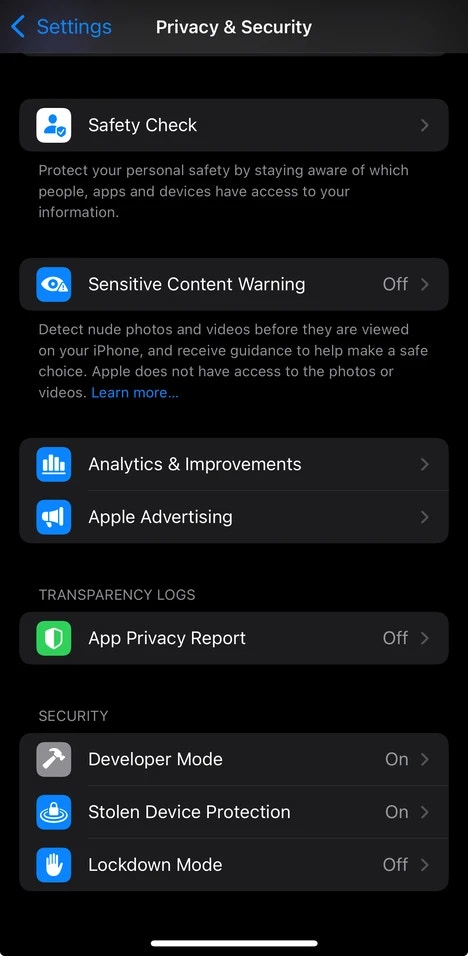
### 2.1 Enable iPhone Developer Mode
To allow Xcode to install your **iOS** application on your device, you must enable **Developer Mode**:
1. Open **Settings** on your iPhone
2. Go to **Privacy & Security**
3. Scroll down and tap **Developer Mode**
4. Toggle it on
 ### 2.2 Enable Associated Domains Development
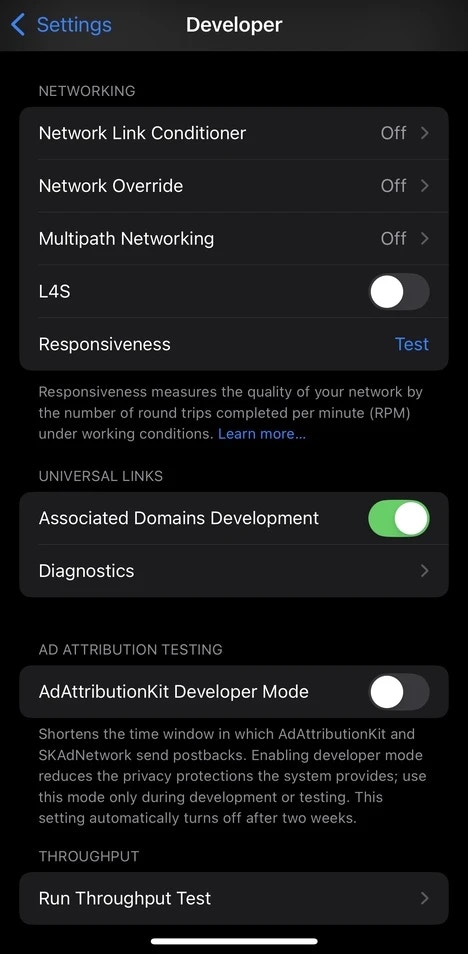
To enable your device to bypass the **AASA (Apple-App-Site-Association)** file cache using `?mode=developer`, you must enable **Associated Domains Development**:
1. Open **Settings** on your iPhone
2. Scroll down to **Developer** and tap it
3. Scroll down to **Associated Domains Development**
4. Toggle it on
### 2.2 Enable Associated Domains Development
To enable your device to bypass the **AASA (Apple-App-Site-Association)** file cache using `?mode=developer`, you must enable **Associated Domains Development**:
1. Open **Settings** on your iPhone
2. Scroll down to **Developer** and tap it
3. Scroll down to **Associated Domains Development**
4. Toggle it on
 For further insights, refer to the [documentation](/corbado-connect/helpful-guides/rpid-configuration/native-mobile#2-1-aasa-and-entitlements-file) on **AASA** files.