> ## Documentation Index
> Fetch the complete documentation index at: https://docs.corbado.com/llms.txt
> Use this file to discover all available pages before exploring further.
# Privacy and Data Policies
> How Corbado Observe protects personal data, which purposes it supports and how data policies set retention per purpose.
Corbado Observe measures authentication with a minimum of personal data. It works with pseudonymous identifiers, does not capture credentials and lets you set retention per purpose with **data policies**. This page summarizes the built-in protections, the purposes Observe supports and how to align retention with your privacy requirements.
 ## 1. Built-in protections
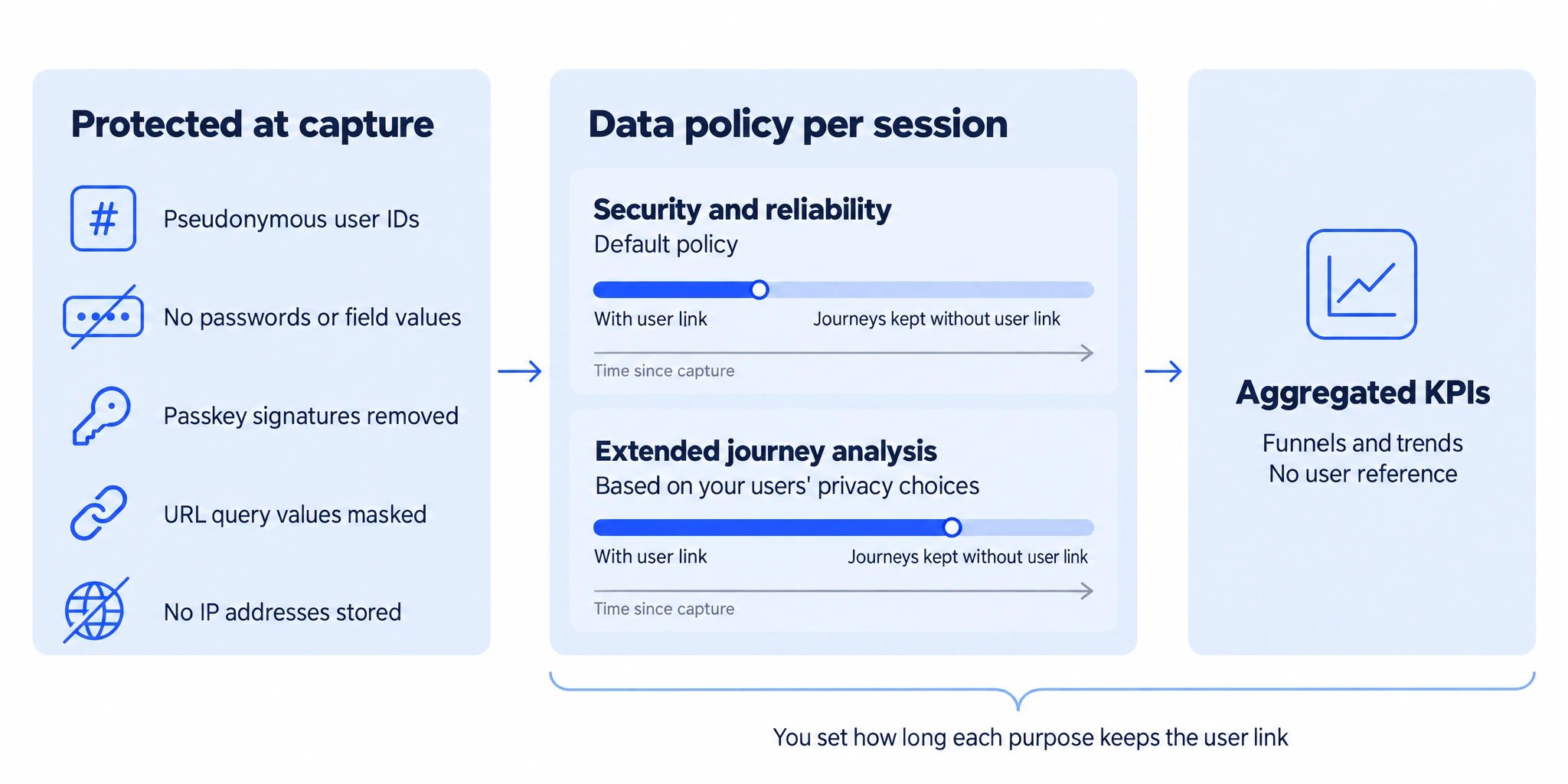
* **Pseudonymous identifiers:** Observe links journeys to the user reference your integration sends. Configured Autocapture integrations hash the identifier in the browser, so email addresses and phone numbers are not sent to Corbado. With custom events, send a pseudonymous value such as a keyed hash and compute the same value in your own systems to join the data.
* **No credentials or field values:** Observe does not capture passwords, one-time codes or other input values. The web SDK records how a field was used, for example focus, paste, autofill and changes in length. It does not read the clipboard.
* **Protected passkey telemetry:** Autocapture removes user names, display names, assertion signatures and PRF outputs from WebAuthn telemetry. Credential and authenticator metadata such as AAGUID, transports and backup state remain available for analysis. For custom events, the web SDK provides the same sanitization functions.
* **Masked URL queries:** the web SDK replaces query values in reported page URLs with `*` and does not report URL fragments. Paths are reported as they are, so keep personal data out of them. See [data handling](/corbado-observe/overview/constraints#4-data-handling) for allowlisting.
* **No IP addresses in the data model:** Observe does not store client IP addresses or derive locations from them. Dimensions such as country come from [tags](/corbado-observe/tracking/tags) your integration sets.
* **First-party storage:** SDK storage is scoped to your origin and project. The device identity is a random value. Observe stores no advertising identifiers and does no cross-site tracking.
* **Aggregated KPIs without user reference:** time series, funnels and trends contain no user reference.
If your policy requires that Corbado never receives client IP addresses, route event delivery through your own proxy and remove them there. The SDKs send to a configurable API base URL. Forward the browser's `Origin` header unchanged so origin checks continue to work.
## 2. Purposes and retention
Authentication telemetry serves several purposes, each with its own retention needs:
| Purpose | Typical questions | Data needed |
| ------------------------------------------- | ------------------------------------------------------------------------------------------------------------------------------ | --------------------------------------------------------------------- |
| **Authentication security and reliability** | Did a release or platform update break a login method? Are bots, credential stuffing or account enumeration hitting the login? | Recent journeys with a pseudonymous user reference for investigation |
| **Extended journey analysis** | How do returning users adopt passkeys? How do methods perform for the same users over months? | Journeys linked to a pseudonymous user reference over a longer period |
| **Aggregated reporting** | How do success rates, funnels and methods develop? | No user reference |
Data policies let you keep each type of data for as long as its purpose requires. A common setup bases the default policy on the legitimate interest in secure and reliable authentication (Art. 6(1)(f) GDPR) and selects an extended policy based on the user's privacy choices. As the controller, you decide the legal basis and describe it in your privacy notice.
## 3. Data policies
A data policy has a numeric code and three retention periods, each counted in days from capture:
| Setting | When the period ends |
| ----------------- | ------------------------------------------------------------------------------------------------------------ |
| **Tracking data** | Raw events, batches, tags, user references and device information of the session are deleted |
| **User link** | The pseudonymous user reference is removed from flows and subflows. The journeys stay available for analysis |
| **Flows** | Flows and the records derived from them are deleted |
A period of `0` keeps the data without a time limit. Aggregated KPIs contain no user reference, so removing the user link does not change them.
Code `0` is the project default and applies to every session that has not selected another policy. Configure policies in the [management console](https://app.corbado.com) under **Observe → Settings → Data policies**. A code keeps its meaning once created, because stored sessions reference it. You can rename a policy and adjust its periods at any time.
### Example configuration
| Code | Name | Applies when | User link |
| ---- | ------------------------- | -------------------------------------------------- | ------------------------------------------------------------- |
| `0` | Security and reliability | By default | For the period your security and reliability purposes require |
| `1` | Extended journey analysis | The user's privacy choices allow extended analysis | For your analysis period |
When the user link of a journey is removed, the journey continues to count in KPIs, funnels and trends. Patterns identified in recent journeys, such as a bot signature or a recurring error sequence, can still be applied to it.
## 4. Select a policy per session
Your integration selects the policy for each session. Create the policy in the management console before your integration selects its code.
Available from web SDK 0.16.6. Pass the code at initialization and update it when the user's privacy choices change:
```javascript theme={null}
import { init } from "@corbado/observe";
const tracker = init({
projectId: "",
apiBaseUrl: "",
dataPolicy: 0,
});
// After the user's privacy choices change
tracker.setDataPolicy(1);
```
The SDK stores the selected code per project in the browser and sends it with every batch, across page loads and new sessions. Call `setDataPolicy()` again whenever the choice changes, including a return to `0`.
Corbado configures how your bundle selects the policy, for example from the state of your consent management platform. Agree the codes and the source of the user's choice when your integration is configured.
The iOS and Android SDKs select the policy the same way as the web SDK. Pass the code when initializing the tracker and call `setDataPolicy()` when the user's privacy choices change. The SDK stores the selected code in the app and sends it with every batch.
Observe applies the most recent code it receives for a session to the whole session, including events recorded before the change.
## 5. Processing, hosting and access
* **Roles:** you are the controller. Corbado processes Observe data on your behalf under a data processing agreement. [Contact us](mailto:support@corbado.com) for the agreement and the technical and organisational measures. The list of subprocessors is in the [Corbado Trust Center](https://trust.corbado.com).
* **Hosting:** Observe runs on Corbado's public cloud by default. Dedicated instances in a chosen region are available for enterprise deployments. See [projects, environments and hosting](/corbado-observe/overview/constraints#8-projects-environments-and-hosting).
* **Transport:** SDKs and API clients communicate with Observe over HTTPS.
* **Access:** API keys carry operation-specific permissions, can be restricted to IP addresses and expire. See [API authentication](/api-reference/observe/authentication).
Certifications, encryption and access control are summarized in [security and compliance](/corbado-observe/security/overview).
## 6. Requests from individual users
Export or delete the Observe data of a user by the user reference your integration sends. Deletion covers the data stored by Observe. Copies you have loaded into your own systems follow your own deletion process. See [user data export and deletion](/api-reference/observe/user-data).
What Observe collects, storage and hosting.
API, exports and security of data outside the console.
## 1. Built-in protections
* **Pseudonymous identifiers:** Observe links journeys to the user reference your integration sends. Configured Autocapture integrations hash the identifier in the browser, so email addresses and phone numbers are not sent to Corbado. With custom events, send a pseudonymous value such as a keyed hash and compute the same value in your own systems to join the data.
* **No credentials or field values:** Observe does not capture passwords, one-time codes or other input values. The web SDK records how a field was used, for example focus, paste, autofill and changes in length. It does not read the clipboard.
* **Protected passkey telemetry:** Autocapture removes user names, display names, assertion signatures and PRF outputs from WebAuthn telemetry. Credential and authenticator metadata such as AAGUID, transports and backup state remain available for analysis. For custom events, the web SDK provides the same sanitization functions.
* **Masked URL queries:** the web SDK replaces query values in reported page URLs with `*` and does not report URL fragments. Paths are reported as they are, so keep personal data out of them. See [data handling](/corbado-observe/overview/constraints#4-data-handling) for allowlisting.
* **No IP addresses in the data model:** Observe does not store client IP addresses or derive locations from them. Dimensions such as country come from [tags](/corbado-observe/tracking/tags) your integration sets.
* **First-party storage:** SDK storage is scoped to your origin and project. The device identity is a random value. Observe stores no advertising identifiers and does no cross-site tracking.
* **Aggregated KPIs without user reference:** time series, funnels and trends contain no user reference.
If your policy requires that Corbado never receives client IP addresses, route event delivery through your own proxy and remove them there. The SDKs send to a configurable API base URL. Forward the browser's `Origin` header unchanged so origin checks continue to work.
## 2. Purposes and retention
Authentication telemetry serves several purposes, each with its own retention needs:
| Purpose | Typical questions | Data needed |
| ------------------------------------------- | ------------------------------------------------------------------------------------------------------------------------------ | --------------------------------------------------------------------- |
| **Authentication security and reliability** | Did a release or platform update break a login method? Are bots, credential stuffing or account enumeration hitting the login? | Recent journeys with a pseudonymous user reference for investigation |
| **Extended journey analysis** | How do returning users adopt passkeys? How do methods perform for the same users over months? | Journeys linked to a pseudonymous user reference over a longer period |
| **Aggregated reporting** | How do success rates, funnels and methods develop? | No user reference |
Data policies let you keep each type of data for as long as its purpose requires. A common setup bases the default policy on the legitimate interest in secure and reliable authentication (Art. 6(1)(f) GDPR) and selects an extended policy based on the user's privacy choices. As the controller, you decide the legal basis and describe it in your privacy notice.
## 3. Data policies
A data policy has a numeric code and three retention periods, each counted in days from capture:
| Setting | When the period ends |
| ----------------- | ------------------------------------------------------------------------------------------------------------ |
| **Tracking data** | Raw events, batches, tags, user references and device information of the session are deleted |
| **User link** | The pseudonymous user reference is removed from flows and subflows. The journeys stay available for analysis |
| **Flows** | Flows and the records derived from them are deleted |
A period of `0` keeps the data without a time limit. Aggregated KPIs contain no user reference, so removing the user link does not change them.
Code `0` is the project default and applies to every session that has not selected another policy. Configure policies in the [management console](https://app.corbado.com) under **Observe → Settings → Data policies**. A code keeps its meaning once created, because stored sessions reference it. You can rename a policy and adjust its periods at any time.
### Example configuration
| Code | Name | Applies when | User link |
| ---- | ------------------------- | -------------------------------------------------- | ------------------------------------------------------------- |
| `0` | Security and reliability | By default | For the period your security and reliability purposes require |
| `1` | Extended journey analysis | The user's privacy choices allow extended analysis | For your analysis period |
When the user link of a journey is removed, the journey continues to count in KPIs, funnels and trends. Patterns identified in recent journeys, such as a bot signature or a recurring error sequence, can still be applied to it.
## 4. Select a policy per session
Your integration selects the policy for each session. Create the policy in the management console before your integration selects its code.
Available from web SDK 0.16.6. Pass the code at initialization and update it when the user's privacy choices change:
```javascript theme={null}
import { init } from "@corbado/observe";
const tracker = init({
projectId: "",
apiBaseUrl: "",
dataPolicy: 0,
});
// After the user's privacy choices change
tracker.setDataPolicy(1);
```
The SDK stores the selected code per project in the browser and sends it with every batch, across page loads and new sessions. Call `setDataPolicy()` again whenever the choice changes, including a return to `0`.
Corbado configures how your bundle selects the policy, for example from the state of your consent management platform. Agree the codes and the source of the user's choice when your integration is configured.
The iOS and Android SDKs select the policy the same way as the web SDK. Pass the code when initializing the tracker and call `setDataPolicy()` when the user's privacy choices change. The SDK stores the selected code in the app and sends it with every batch.
Observe applies the most recent code it receives for a session to the whole session, including events recorded before the change.
## 5. Processing, hosting and access
* **Roles:** you are the controller. Corbado processes Observe data on your behalf under a data processing agreement. [Contact us](mailto:support@corbado.com) for the agreement and the technical and organisational measures. The list of subprocessors is in the [Corbado Trust Center](https://trust.corbado.com).
* **Hosting:** Observe runs on Corbado's public cloud by default. Dedicated instances in a chosen region are available for enterprise deployments. See [projects, environments and hosting](/corbado-observe/overview/constraints#8-projects-environments-and-hosting).
* **Transport:** SDKs and API clients communicate with Observe over HTTPS.
* **Access:** API keys carry operation-specific permissions, can be restricted to IP addresses and expire. See [API authentication](/api-reference/observe/authentication).
Certifications, encryption and access control are summarized in [security and compliance](/corbado-observe/security/overview).
## 6. Requests from individual users
Export or delete the Observe data of a user by the user reference your integration sends. Deletion covers the data stored by Observe. Copies you have loaded into your own systems follow your own deletion process. See [user data export and deletion](/api-reference/observe/user-data).
What Observe collects, storage and hosting.
API, exports and security of data outside the console.