

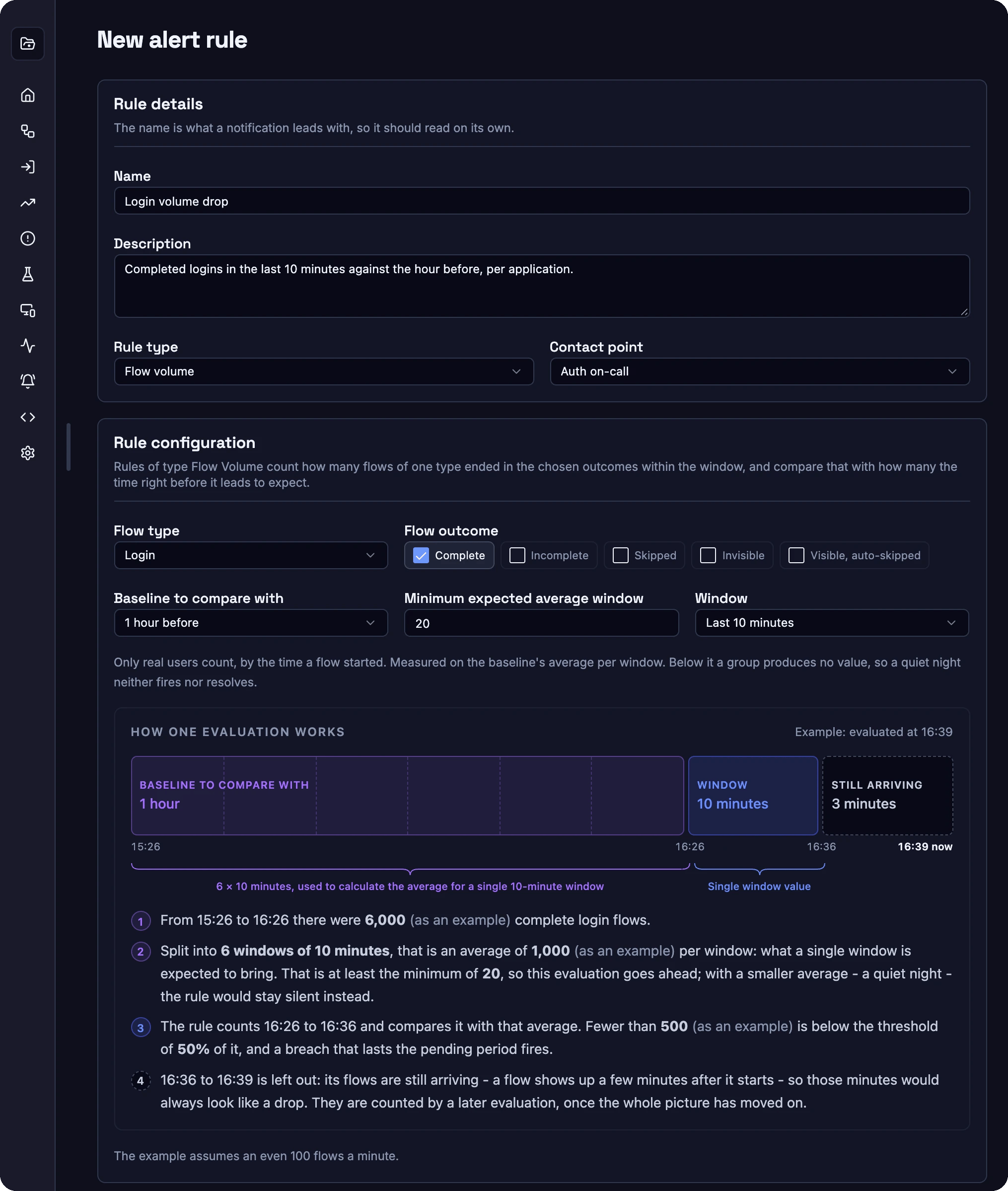
Rule builder for a flow volume rule: completed logins in the last 10 minutes against the hour before.
1. Rule types
The builder offers a rule type, flow type or subflow type once your project has the data for it. If a type you need is missing, contact Corbado to enable it for your project.
2. Flow volume
Flow volume answers whether the expected number of flows still arrives. It counts the flows of one type that ended in the selected outcomes and compares the window with the baseline window right before it:below 25 fires when fewer than 250 arrive.
Supported flow types:
Outcomes:
Complete (default), Incomplete, Skipped, Invisible and Visible, auto-skipped. The outcomes are explained in flow events. Counting Incomplete turns the rule into a spike detector for failing journeys.
Baseline: 30 minutes, 1 hour (default), 2 hours or 3 hours before the window. A short baseline follows the daily curve closely. A longer one smooths short bursts.
3. Subflow volume
Subflow volume works like flow volume for a single method or step. Use it for partial defects that the overall login volume hides, for example social login failing while passkey and password logins keep the total stable. Outcomes:Completed (default) or Incomplete.
Supported subflow types:
The subflow types correspond to the subflows you send or Autocapture records. Decisions are not available because they have no completion to count.
4. Login success rate
Login success rate divides completed logins by all logins in the rule’s engaged population. This population requires a qualifying subflow or nested flow and excludes automated-test traffic. A resolved decision alone does not qualify for this metric, although it can satisfy the broader engagement filter. Engagement does not necessarily mean deliberate user interaction. The rule reads hourly data and judges an hour once it is complete and final, about 10 minutes after it ends. Use it for steady quality signals, such as “login success on Chrome stays above 90%”, and use the volume rules for fast outage detection.5. Funnel conversion change
Funnel conversion change turns the funnel history into alerts for one known step. Pick a start node and a target node, for example identifier submitted to login completed. The value is the relative change of that conversion against the comparison period. Comparison period: the previous day, the same weekday last week (default) or the average of the same weekday over the last four weeks.6. Anomaly detection
Anomaly detection watches one funnel node and scans its cohorts across browser, browser version, OS and your custom tags, like Find changes in the funnel history. It alerts per cohort on a movement, a new gap or a persistent gap against the rest of the traffic, for example:- Passkey login on a new browser release: completion of passkey login drops on Chrome 150 on Android while all other browsers stay stable.
- Rising fallback: more journeys reach the password fallback after a failed passkey attempt on one iOS version.
- New route: a share of logins suddenly continues into recovery after the identifier step in one market.
- Market gap: one market’s social login completion falls clearly below the other markets.
- Lost autofill: the share of logins completed through autofill drops on one password manager or OS.
7. Finding incident
Findings are part of Corbado’s managed enterprise service. Corbado combines the anomaly analysis, observed errors, funnel changes and your new releases, checks them against the raw journeys and your source code or minified bundles, and publishes the result as a finding:- Segment and impact: who is affected, compared with which group, and the estimated affected users and lost completions.
- Errors: the errors involved and their classification, for example a client-side WebAuthn error, a backend rejection or a third-party failure.
- Verification: manual tests or automated test runs that reproduce the problem and later confirm the fix.
- Action: what happens, how to reproduce it and who has to act, for example your frontend, your backend, a third party or the platform vendor.
8. Group by dimension
Grouping creates one alert per combination of values. Each alert has its own state, pending clock and history, so a drop on one browser fires without waiting for the others.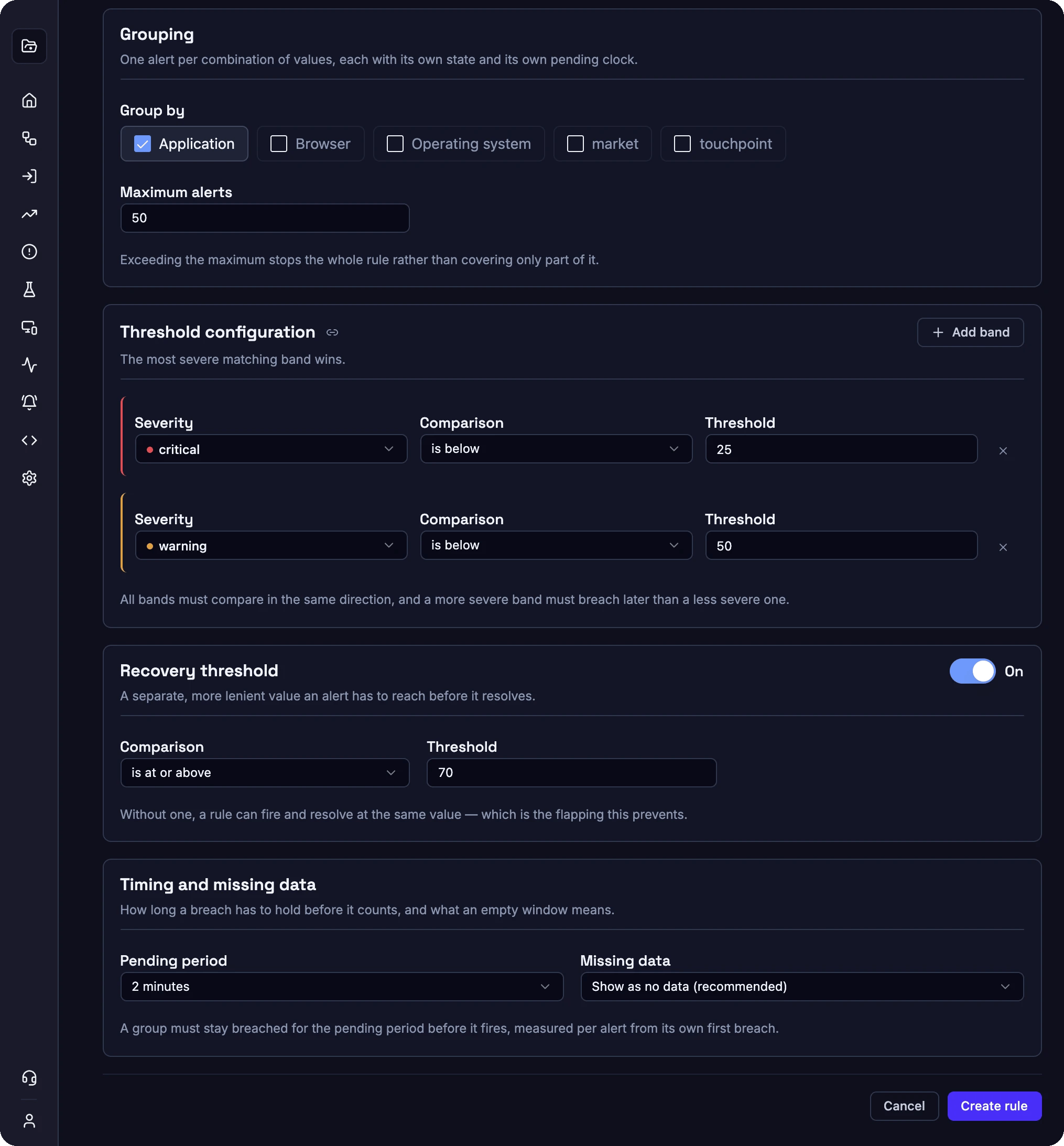
Grouping, severity bands, recovery threshold and timing of the same rule.
Anomaly detection alerts per discovered cohort, and finding incident uses the finding’s segment. Custom tags are the tags your project uses for alerting, such as market, product or touchpoint. Each time series can expose up to 20 configured custom tags; the rule offers the tags available in its source series.
Filter groups: narrow a flow-volume or subflow-volume rule to the exact dimension combinations you want to watch. Choose grouping dimensions first, then select up to 50 complete combinations. An empty selection watches all combinations. The picker offers combinations observed in the last 24 hours. Its suggestions describe recent traffic, not the rule’s evaluation window or historical retention.
Maximum alerts: a rule creates at most 50 alerts by default, configurable up to 500. If grouping produces more combinations, the whole rule stops with an error, so a partly watched rule always shows up. Combine fewer dimensions or raise the limit.
9. Thresholds and severities
A rule carries one or more severity bands:critical, warning and info. Each band compares the value with a threshold, for example is below 25. The most severe matching band wins, and an alert that worsens from warning to critical sends an escalation.
Recovery threshold: an optional, more lenient value an alert has to reach before it resolves, for example is at or above 70. Without it, a value that hovers around the threshold fires and resolves repeatedly.
Pending period: how long a breach has to hold before the alert fires. Volume rules offer 1 to 30 minutes and default to 2 minutes. Login success rate offers 10 minutes to 6 hours. “Fire on the first breach” skips the pending period.
Minimum sample: volume rules use a minimum expected average per window, login success rate a minimum number of engaged logins. A group below the minimum produces no value and follows the configured missing-data policy. About 20 flows per window is a good starting point for volume rules.
Missing data: what an alert does when its group has no value. Choose between showing no data (recommended), treating it as normal, treating it as firing or keeping the last status. No data stays distinct from a measured zero.
10. Business hours
Business hours define when a rule judges its groups. Outside them, a firing alert stays firing and sends no notification. A pending alert returns to normal, so its pending period starts again when evaluation resumes. Evaluation history marks the missing value as outside evaluation hours, separately from missing traffic. Set weekly time ranges in 15-minute steps on the rule. The rule uses the project timezone. Ranges stay within one day; split an overnight schedule into two ranges. An override for one exact group can use different hours and an optional IANA timezone, for exampleAustralia/Sydney for one market. Omit that timezone to follow the project timezone, or choose At any time to evaluate that group around the clock. Groups without an hours override inherit the rule schedule.
Business hours decide whether an alert is judged. Delivery hours on a contact point decide whether a notification is sent. Use business hours for quiet periods of your traffic and delivery hours for the working hours of a team.