

1. Built-in protections
- Control over account references: choose independently whether to send the submitted identifier and your user ID in clear text or already hashed. Hash before sending when Corbado should never receive the clear value. Data policies can hash clear values later and delete references when their retention ends. See how to choose.
- No credentials or field values by default: Observe does not capture passwords, one-time codes or other input values. Input interaction tracking records how a field was used, for example focus, paste, autofill and changes in length. It does not read the clipboard. The submitted account identifier is the one exception and is sent only when your integration passes it with a subflow step.
- Protected passkey telemetry: Autocapture removes user names, display names, assertion signatures and PRF outputs from WebAuthn telemetry. Credential and authenticator metadata such as AAGUID, transports and backup state remain available for analysis. For custom events, the web SDK provides the same sanitization functions. Their optional user identifier projector can transform or omit creation
user.idand responseuserHandlefrom custom-event telemetry. It does not redact credential IDs or identifiers inside encoded blobs. - Masked URL queries: the web SDK replaces query values in reported page URLs with
*and does not report URL fragments. Paths are reported as they are, so keep personal data out of them. See data handling for allowlisting. - No IP addresses in the data model: Observe does not store client IP addresses or derive locations from them. Dimensions such as country come from tags your integration sets.
- Password-manager evidence: when browser-extension detection is enabled, the web SDK reports detected manager names, without the detector’s optional sign-in flag. Recognized passkeys can also establish manager sightings. See password-manager evidence for the collection limits.
- First-party storage: SDK storage is scoped to your origin and project. The device identity is a random value. Observe stores no advertising identifiers and does no cross-site tracking.
- Aggregated KPIs without user reference: time series, funnels and trends contain no user reference.
Origin header unchanged so origin checks continue to work.
2. Purposes and retention
Authentication telemetry serves several purposes, each with its own retention needs:
For a standard setup, send both values in clear text, hash submitted identifiers after 30 days and retain user IDs according to the project’s default policy. Readable identifiers help support recognize typos and corrections during recent investigations. Sensitive values can be hashed before sending instead. See users and identifiers.
Data policies let you keep each type of data for as long as its purpose requires. A common setup bases the default policy on the legitimate interest in secure and reliable authentication (Art. 6(1)(f) GDPR) and selects an extended policy based on the user’s privacy choices. As the controller, you decide the legal basis and describe it in your privacy notice.
3. Data policies
A data policy has a numeric code and periods counted in days from capture. Hashing and deletion have different outcomes:- Hashing: replaces clear values with stable hashes, also called pseudonymization through hashing. The same user can still be recognized across journeys. Hashing does not remove user relationships or verify ownership of a submitted identifier.
- Deletion: deletes the stored identifier or user ID references, removing the corresponding links. This is also called unlinking. Retained journeys remain available without those references.
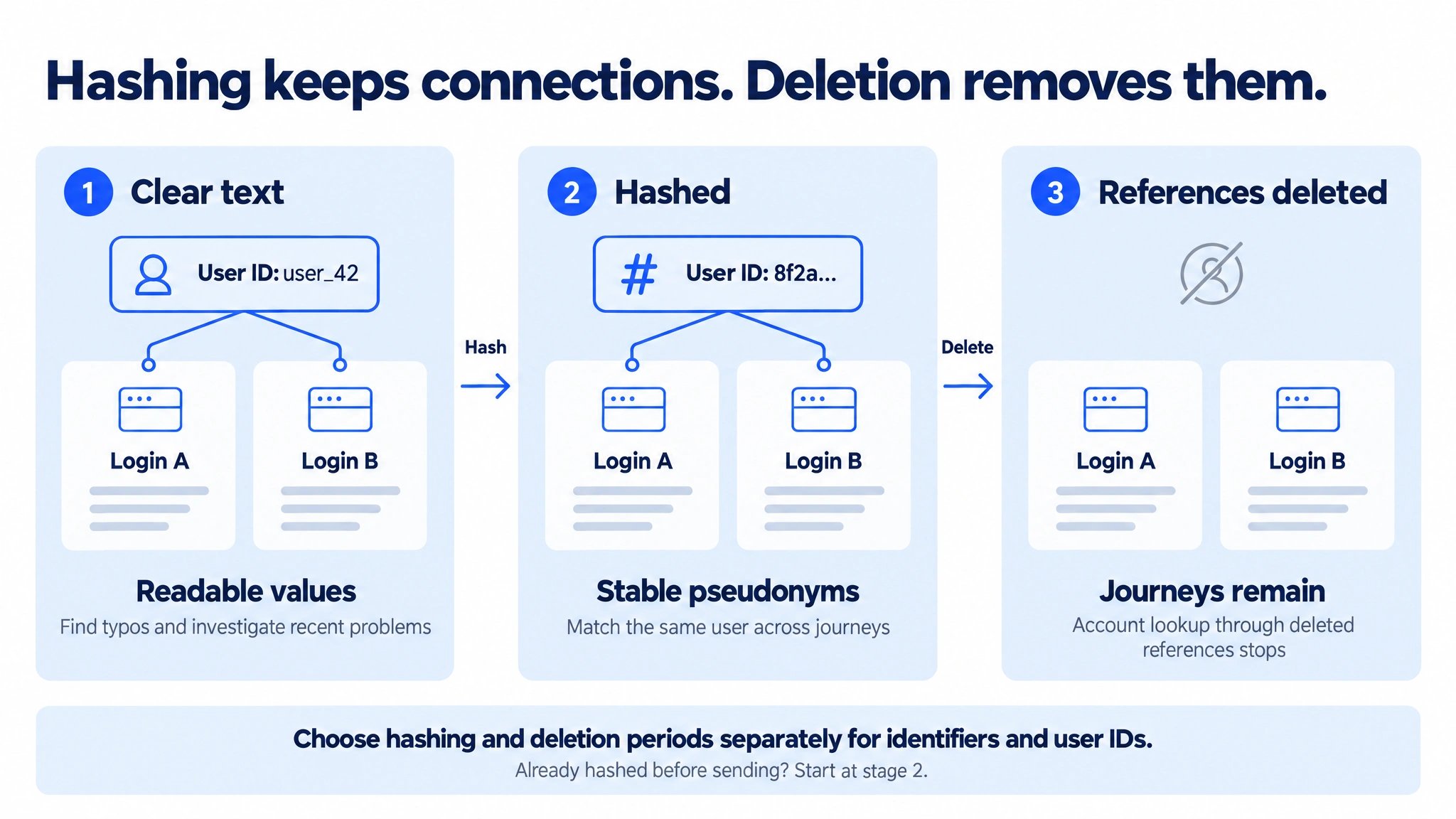
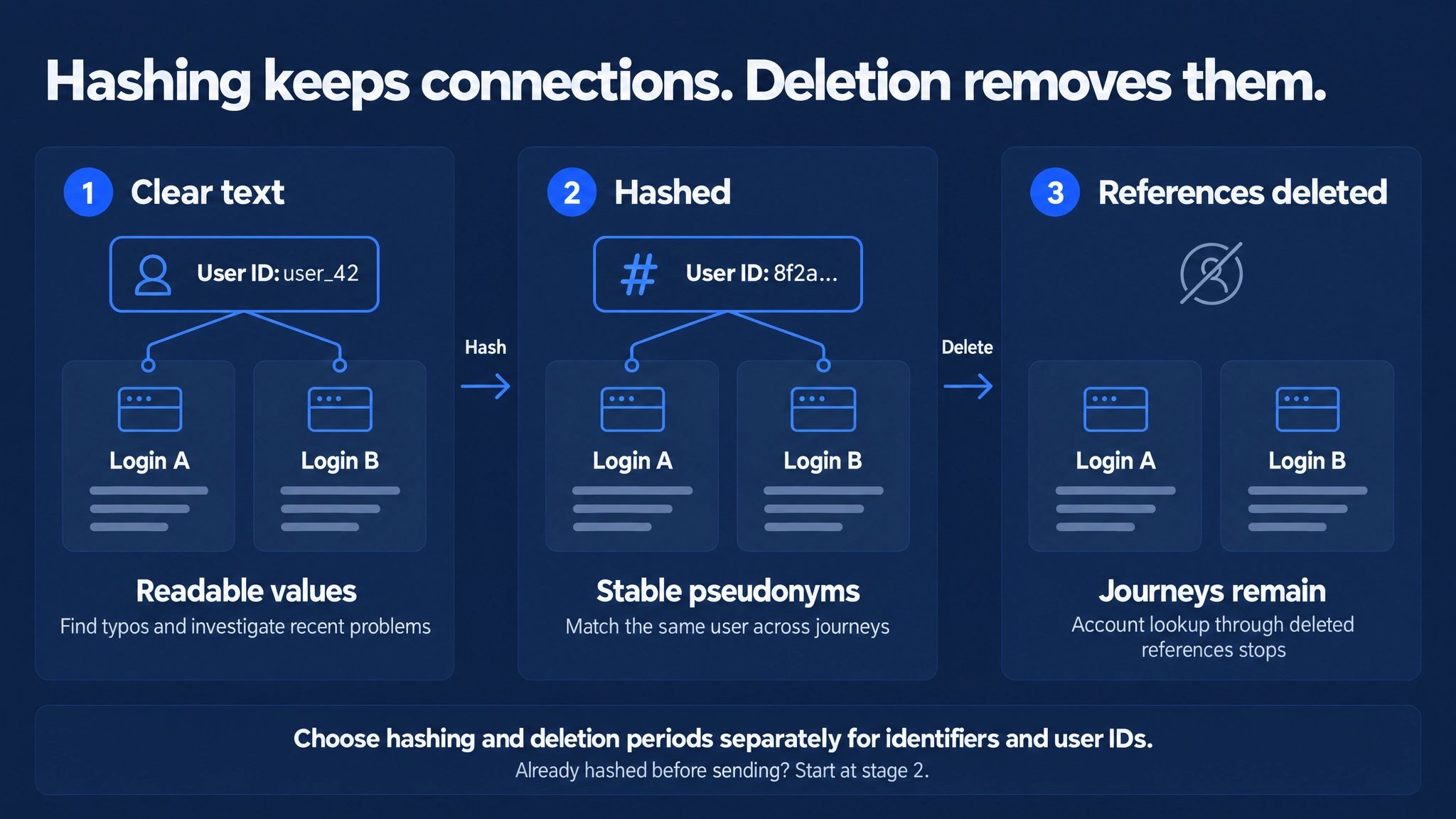
Hashing preserves matching across journeys. Deleting account references removes their links while retained journeys remain. The example shows a user ID; identifiers have their own hashing and deletion periods.
A retention period of
0 means no automatic deletion for that setting. Hashing preserves references until their deletion period ends; it does not extend retention. Aggregated KPIs contain no user reference, so hashing or deleting these references does not change them.
Code 0 is the project default and applies to every session that has not selected another policy. Configure policies in the management console under Observe → Settings → Data policies. A code keeps its meaning once created, because stored sessions reference it. You can rename a policy and adjust its periods at any time.
Example configuration
Both example policies receive clear-text identifiers and user IDs:
Under either policy, delete both references when the retention period for that purpose ends. Hashing both values under the extended policy preserves long-term user analysis until then. The retained journeys continue to count in KPIs, funnels and trends. Configure periods appropriate to your needs.
4. Select a policy per session
Your integration selects the policy for each session. Create the policy in the management console before your integration selects its code.- Web SDK
- Autocapture
- iOS and Android
Available from web SDK 0.16.6. Pass the code at initialization and update it when the user’s privacy choices change:The SDK stores the selected code per project in the browser and sends it with every batch, across page loads and new sessions. Call
setDataPolicy() again whenever the choice changes, including a return to 0.5. Processing, hosting and access
- Roles: you are the controller. Corbado processes Observe data on your behalf under a data processing agreement. Contact us for the agreement and the technical and organisational measures. The list of subprocessors is in the Corbado Trust Center.
- Hosting: Observe runs on Corbado’s public cloud by default. Dedicated instances in a chosen region are available for enterprise deployments. See projects, environments and hosting.
- Transport: SDKs and API clients communicate with Observe over HTTPS.
- Access: API keys carry operation-specific permissions, can be restricted to IP addresses and expire. See API authentication.
6. Requests from individual users
Export or delete the Observe data of a user using the current stored form of their external user ID, including any hashing. A user-data deletion request is separate from a policy that deletes account references while keeping journeys. Copies you have loaded into your own systems follow your own deletion process. See user data export and deletion.Compatibility & constraints
What Observe collects, storage and hosting.
Data access
API, exports and security of data outside the console.