

1. How the model fits together
2. Exported tables
Table exports contain 43 tables. They fall into five groups:ob_flow already includes the client environment fields of each flow, so most journey analysis starts there and joins subflows by flow ID.
ob_time_series_data holds pre-calculated KPI data. Both this table and ob_time_series_experiment_data export a rolling calendar month ending at the export cutoff, so successive snapshots overlap. For reports that match the console, use time-series exports with the same interval, dimensions and filters. Recalculate from flows and subflows for questions the series do not cover.
ob_tracking_password_manager stores one browser-extension detection per session and manager. Its export window uses server-side ingested, when the row was first stored. first_detected_at is the earliest reported client time and can move earlier after a later report; that update does not rewrite an existing export. Accumulated client-environment sightings, including passkey evidence, are available through client environment search and are not a standalone table export.
The optional integration_version on ob_tracking_event_batch identifies the web integration revision separately from the SDK version. See integration revision.
3. Types, keys and identifiers
- IDs: unsigned 64-bit integers. Preserve the full unsigned range. If your platform only supports signed 64-bit integers, use a lossless decimal or string representation and apply it consistently to join keys.
- Timestamps: UTC with microsecond precision.
- JSON columns: exported as strings. Parse them in your platform where needed.
- Nullable columns: exported as nullable fields.
- Joins: flows reference their session, subflows reference their flow and events map to flows through
ob_event_flow. - Row grain: newly generated
ob_flowandob_email_link_sub_flowfiles contain one row per flow or email-link subflow. Older files can repeat a row for each device snapshot in its session; deduplicate byidbefore counting or joining them. See existing export files for reload guidance. - Identifiers and user IDs: initially stored as sent by your integration, in clear text or hashed. Data policies can later hash clear values or delete their references. Use the representation present in each export for joins. See security and privacy.
Identifier submissions and user links
Identifier submissions are stored inob_subflow_identifier, one row per subflow step that carried a submitted identifier, with its flow, subflow and session. The value lives in the per-project dictionary ob_identifier, initially with the value and type your integration sent and subject to policy-driven hashing or deletion. linked_user_id on a submission is the identifier-to-user link: it is set only when a completed login in the same flow verified that identifier. See Users and identifiers for the rule and examples across devices and authentication methods.
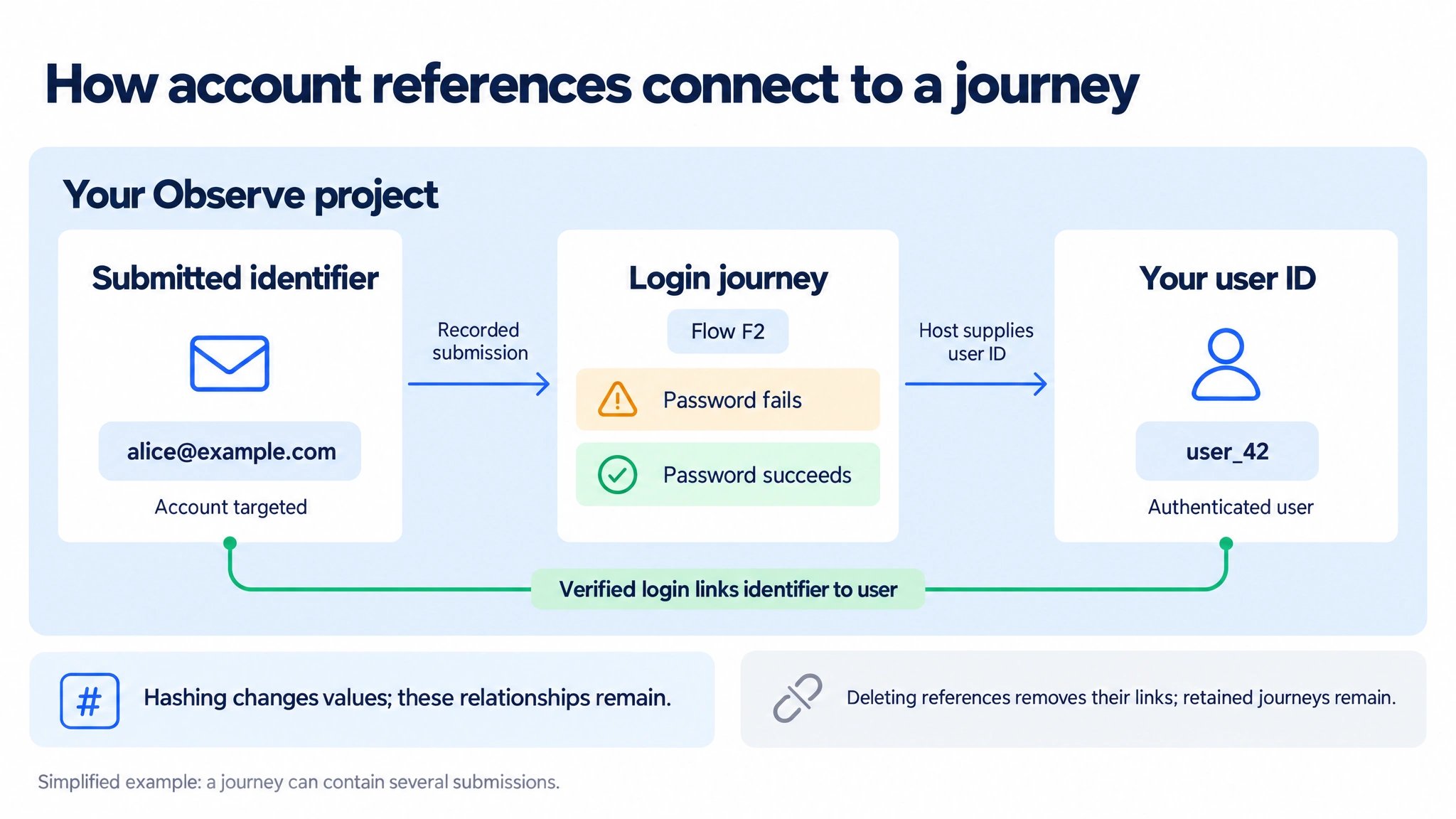
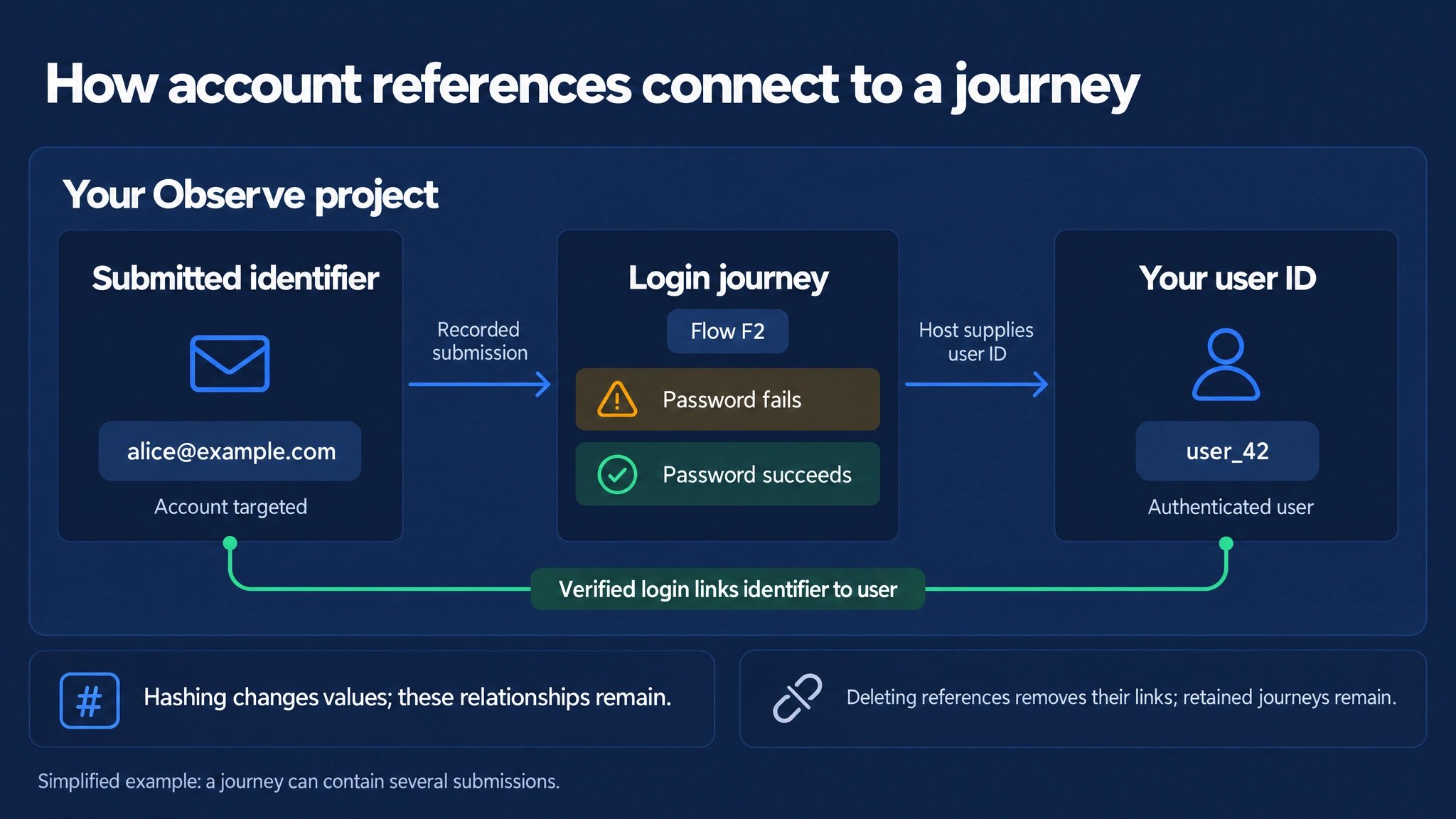
The submitted identifier records the account targeted; the host's user ID identifies the authenticated user. The identifier-to-user link requires a login that verifies that identifier.
data column of exported ob_tracking_event rows.
Keep these relationships separate when joining authentication data to your customer tables:
- Attempt lookup: A submitted identifier finds attempts against that account, including attempts by an unknown person.
- User activity: Use the flow’s user reference and authentication outcome to distinguish authenticated activity from attempts that merely named an account.
- Expanded lookup: An established identifier-to-user link can make other attempts discoverable. Preserve that match reason; do not replace an attempt’s user reference with the user reached through the link.
- Join cardinality: One flow can contain several submissions, and one identifier can have several user links. Preserve individual submissions for investigation and deduplicate flow IDs when counting journeys.
4. Time columns
Each table is exported by its own time column. Subflows use their start time, flows their creation time and events their event time. A journey that starts shortly before midnight can therefore have rows in two export dates. Join across the relevant export dates rather than assuming all related rows share one date. A one-day lookback can cover a midnight boundary, but is not a completeness guarantee for late events or reclassification. Tags and user references also have their own export time columns, which can use server ingestion time.5. Re-classification and snapshots
Observe classifies a session a few minutes after its last event and classifies it again when later events arrive, for example when a user returns to the same session. An exported day is a snapshot of that day at export time. Classification changes after the export are not reflected in files that were already written. Agree the historical regeneration and reload process when your warehouse must reflect these corrections; downloading an unchanged snapshot again does not refresh its contents.6. Schema changes
The export schema follows the data model and grows as Observe adds fields. Configure your loader to accept new columns rather than failing on them, and write transformations that select the columns they need instead of relying on column order.Exports
Schedules, formats and how to download exports.
Connect your data platform
Loading pattern and platform notes.