

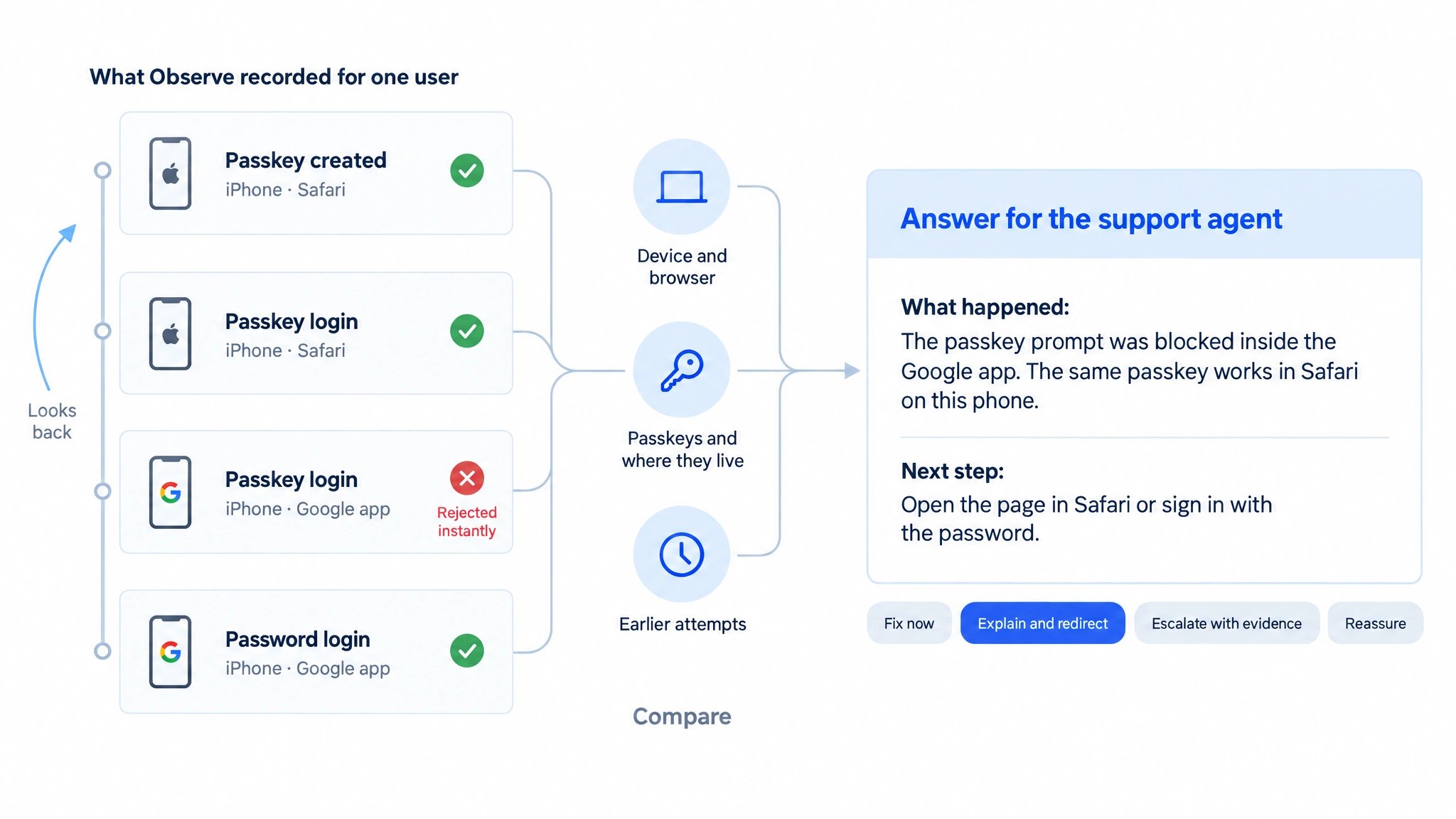
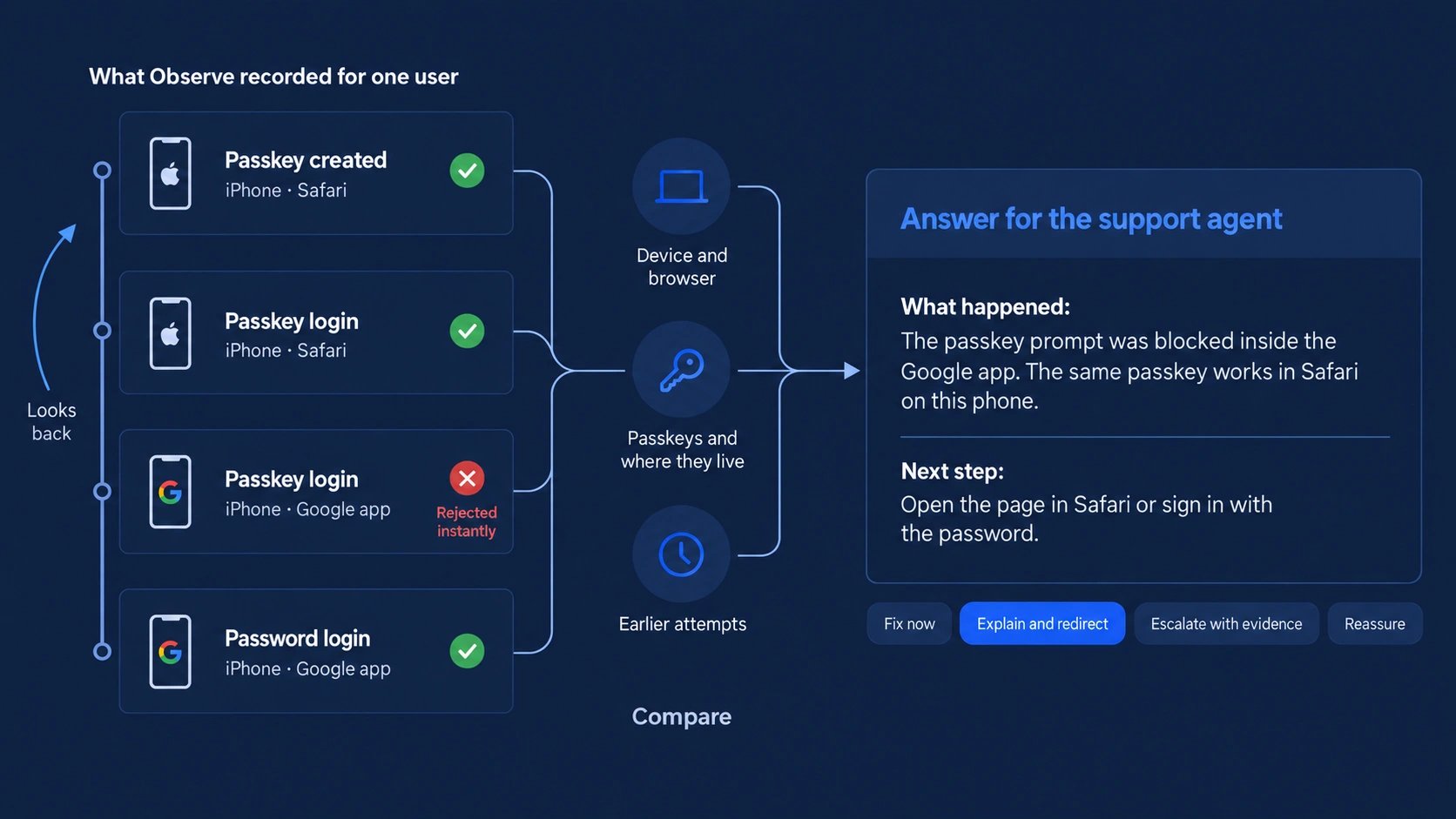
Read left to right: Observe compares the recorded attempts of one user and returns one cause with a next step the agent can say on the call.
1. One knowledge base, two directions
Passkey Intelligence in Observe answers two questions with the same knowledge about how passkeys behave on real devices:
Both directions explain the same failures. A passkey that lives on another device, a credential manager that this browser cannot reach or an in-app browser that blocks the prompt is a cause after the fact and a prediction before the next attempt. Every case the diagnosis explains makes the prediction better, and the other way round.
2. Why passkey failures are hard to explain
A passkey login touches far more than your server. Whether it works depends on the combination of:- Device and OS: iPhone, Android, Windows or Mac, each with its own version history and passkey support.
- Browser: Safari, Chrome, Edge, Firefox, Samsung Internet and in-app browsers inside apps such as Google, Instagram or Facebook.
- Credential manager: iCloud Keychain, Google Password Manager, Samsung Pass, Windows Hello, Microsoft Password Manager or third-party managers such as 1Password or Bitwarden.
- Where the passkey lives: created on this device, synced from another device of the same account or only reachable through a phone via QR code.
- Cross-device capability: whether this device can show a QR code and reach a phone at all.
- User behaviour: a closed prompt, an ignored automatic offer, a second account on a shared device.
3. How the diagnosis works
The diagnosis runs on the data Observe already records. Your integration sends no additional events.1
Collect
Observe gathers everything it knows about the user: devices and browsers, passkeys with where they were created and used, every passkey creation and login attempt with its errors and the other methods the user tried. Failed attempts before the user typed an identifier are included once the user signs in on that device. Users and identifiers explains how these attempts link to the user.
2
Focus
The console selects the user’s latest visible passkey attempt. Through the API, you can select the latest unsuccessful attempt with
onlyFailed: true or identify a specific attempt with actionID. Silent background checks are skipped when selecting the latest attempt.3
Compare
It compares the failed attempt with the user’s other attempts, devices and passkeys, for example the same passkey working in another browser on the same phone, or a device-bound passkey created with Windows Hello on a Windows PC and now tried on an iPhone.
4
Pick one cause
The comparison runs against the Corbado Aggregate Intelligence model, built from over 100 million observed and managed passkey authentications, which ranks the cause groups for every combination of device, browser and credential manager. Exactly one cause wins, so the agent never gets a list of guesses. If no cause fits, the diagnosis says so instead of guessing.
5
Check the outcome
Observe checks whether the user still got through, with a later passkey attempt or another method. The answer then reassures and says what to do next time.
6
Answer
The result is two plain sentences without error codes or technical terms, plus the answer type. The signals behind the answer stay available for level 2 and 3 support.
Cause groups
The diagnosis covers passkey creation and passkey login. The groups below are examples. Corbado extends the set for each Observe deployment based on the failure patterns in its own data.Answer types
Each cause maps to one of four answer types, so the agent knows how to handle the call:
You can adapt the sentences to your own support wording and your fallback methods.
4. Where agents get the answer
Console user view
Search by user ID or by the identifier the user typed. Devices, passkeys and every attempt in one view.
Deep link
Use Copy link in Support insights to share the selected attempt with another support agent.
API
Send the Observe user ID to get the explanation, next step and supporting context inside your service desk tool.
Next steps
Prevent failed logins
Use the same knowledge before the prompt opens and route users to the path that works.
Users and identifiers
How Observe links attempts to a user and how agents find a user by a typed identifier.