

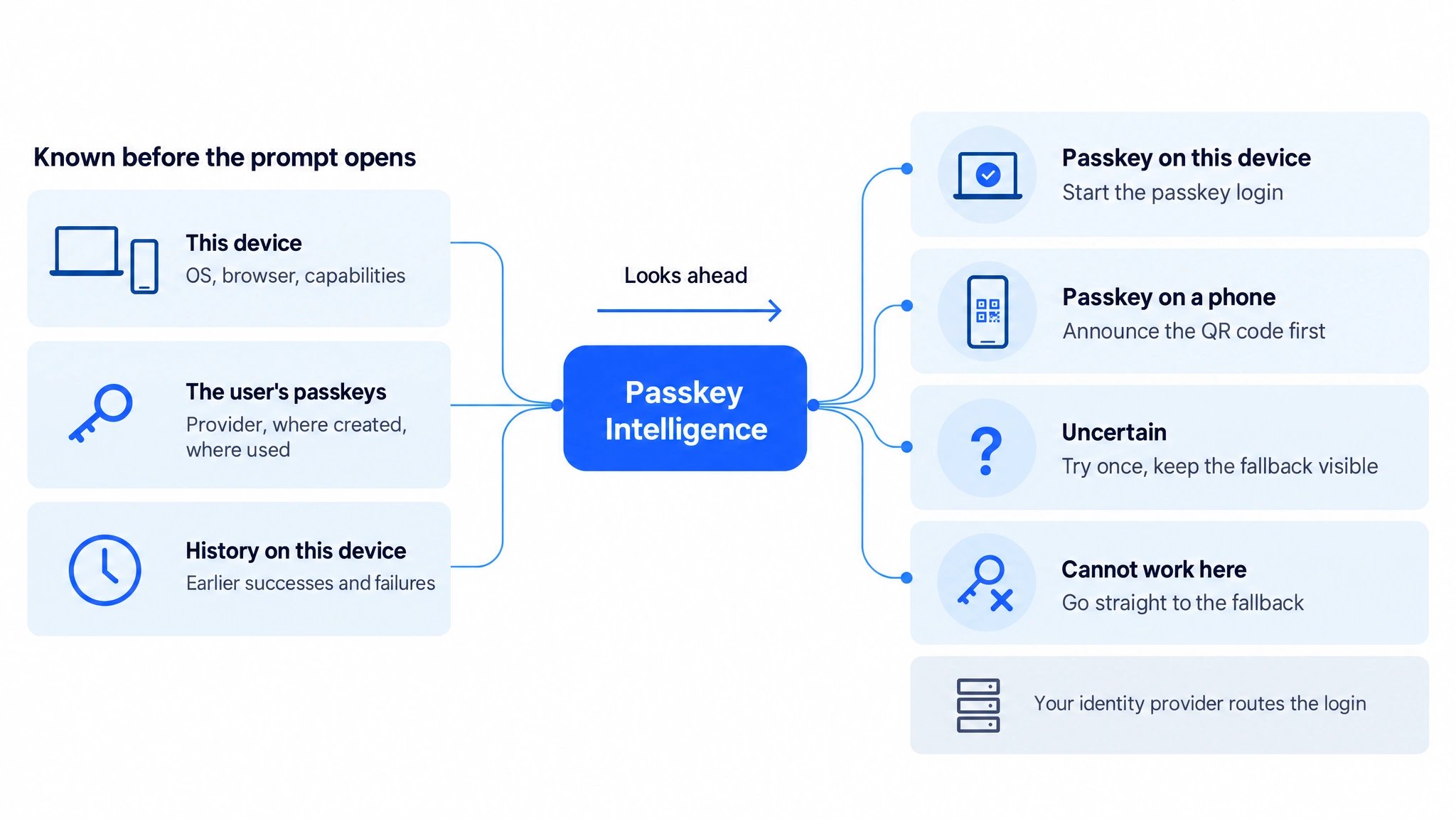
Read left to right: what is known before the prompt opens flows into one prediction, and your identity provider takes one of four routes.
1. Why predict before the prompt
The browser does not tell your website whether a passkey is available on the current device. Your login can only start the ceremony and wait. That causes dead ends that users experience as “passkeys do not work”:- Prompts that cannot or rarely succeed: a device-bound passkey created with Windows Hello on a Windows PC is offered on an iPhone, where it cannot work, or an Apple passkey is offered on an Android phone, where the login has a very low success probability.
- In-app browsers: the login page opens inside an app such as Google or Instagram, where the passkey prompt fails at once.
- Unexpected QR codes: the passkey lives on a phone and the computer shows a QR code without warning, or cannot reach a phone at all.
- Credential managers out of reach: a Google Password Manager passkey in Safari on an iPhone, or a password manager extension that is missing in this browser.
- Retry loops: users try the same failing passkey again and again before they give up or call support.
2. What the prediction uses
The credential IDs alone already tell a lot. In illustrative evaluations, with nothing but the device and the credential IDs, the prediction distinguished “on this device” from “needs the phone” correctly for about 95% of passkey logins, and for about 96% with full passkey details. Phones were close to 100%; desktops with passkeys from other ecosystems were the hard cases. A previous outcome of the same user on the same device is the strongest single signal.
Source: Corbado Aggregate Intelligence, informed by deployments of Corbado Observe and Connect. Figures are illustrative results from selected evaluations of completed passkey logins on held-out days.
3. Four routes
The response carries one verdict and a retry policy:
The retry policy says how many failed tries on this device are worth it before you switch to the fallback, and whether an instant failure should switch at once. Repeated failures in earlier sessions on the same device lead to
fallback directly.
A passkey that Observe saw being created or used in this browser is not blocked. When Observe has no data for the device yet, the response says so and your login runs as it would without Observe.
4. Impact
In illustrative replays of real passkey login attempts, the routes would have prevented 20 to 60% of failed passkey login attempts. About 0.5 to 1% of successful passkey logins would have gone to the fallback instead. The “use your phone” announcement would have been right in 90 to 96% of cases. You can also run Passkey Intelligence in calibration mode first: your login calls the endpoint and records the verdicts without acting on them. This establishes a baseline for your users before you activate the QR code announcement. Source: Corbado Aggregate Intelligence, informed by deployments of Corbado Observe and Connect. Figures are illustrative replay results for deployments without an existing passkey decision layer. The range depends on your implementation and your users:- In-app browsers: the largest lever. Deployments with many logins from inside apps reach the upper end of the range.
- How users retry: where users repeat a failing passkey several times, stopping the loop saves the most.
- Passkeys from other ecosystems: many users with device-bound Windows Hello passkeys or with passkeys on a phone of another platform add impossible and phone-only combinations.
- Password and credential managers out of reach: passkeys saved in a third-party password manager or a credential manager that is not available on the current device or in this browser, for example a missing browser extension.
- Existing checks in your login: rules your login already applies before the prompt reduce what is left to prevent.
5. Integration
1
Capture the login page
Run Autocapture with the Observe SDK on your login page. The Autocapture configuration makes the Observe context
cbo_observe_context accessible to your system: the Observe session plus additional device information. Inject it into your own backend requests or set it as a cookie, so it reaches the backend that makes the call unchanged.2
Load the user's passkeys
After the identifier step, your identity provider or custom login backend reads the credential IDs it stores for the user. Add registration details if you have them.
3
Ask Observe
Call
POST /v1/observe/passkeyIntelligence server to server with the Observe context and the credentials. The API key needs the permission observe:passkeys:read. At least one credential is required; each credential array accepts at most 50 entries.4
Route the login
Follow the verdict and passkey retry policy. Without the Observe context, on an error or timeout, or when the reason is
session-not-ready, continue as you would without Observe. Use a bounded HTTP timeout and do not wait for retries of this call during login.environment.source field says whether the recommendation uses the current browser session (session), an earlier visit on the device (clientEnv) or no device information (none). With none, the reason is session-not-ready and the login continues with its existing behavior.
6. Example: PingAM and PingOne Advanced Identity Cloud
In a PingAM journey, a Scripted Decision node after the account lookup reads the user’s passkeys and the Observe context, here from a cookie, asks Observe and picks the next node. PingOne Advanced Identity Cloud runs the same journeys and the same scripting, so the node works there with the same structure. In a self-built identity system the logic is the same in your own code: read the credential IDs, call the endpoint and branch on the verdict. PingAM stores only the credential ID per passkey, so the node sends plain IDs. The node fails open: without the cookie or without an answer it keeps the journey’s previous rule.Scripted Decision node (PingAM next-generation scripting)
- Script inputs: next-generation Scripted Decision nodes only see declared inputs. Declare
*so the node can read the account lookup. - API key: pass it with the
tokenoption ofhttpClientand keep it in a secret or ESV. A manualAuthorizationheader is rejected. - Cookie scope: the cookie is set on the host of the login page. It reaches the journey when the hosted login page and the journey run on the same host. Otherwise pass the context through a
HiddenValueCallbackintonodeState, as the comment in the script shows. - Phone verdict: to announce the QR code, add a message node on the
phoneoutcome before WebAuthn Authentication. - Retry policy: this example only chooses between passkey and fallback. Add journey logic to apply
retryPolicy.maxTriesandretryPolicy.switchAfterInstantFailure;try-onceshould permit only one passkey attempt before fallback.
Next steps
Support diagnosis
The same knowledge looking back: why did a passkey creation or login fail for this user?
Passkey Intelligence in Corbado Connect
The decision layer built into Corbado Connect, including passkey creation and One-Tap login.